


Building apps with AI: how AI app builders are changing the game
AI app builders are enabling developers – and even non-developers – to build intelligent apps more quickly and affordably. The AI in the mobile apps market alone is expected to grow from USD 21.23 billion in 2024 to around USD 354.09 billion by 2034, with a CAGR (compound annual growth rate) of ~32.5%.
Meanwhile, nearly 78% of businesses have adopted some form of machine learning, data analytics or AI tools by 2024, up sharply from previous years.
In agriculture, AI app builders are unlocking new possibilities. From smart sensors that monitor crop health, to apps using satellite imagery or IoT devices that optimize water use or detect pests early, these tools are helping farmers make data-driven decisions.
AI-powered agriculture apps like CropX, Arable, and Plantix are already making measurable impacts on yield, quality, and resource use.
Is AI really that affordable in practice, and does it mean small and medium-sized businesses can invest minimal budgets in AI apps and still see returns? The answer is: it depends. If the goal is to experiment and learn, AI tools can be a great starting point since they often don’t require a senior developer or mentor for a beginner to build something functional. However, for companies that employ teams and carry responsibility for both people and business outcomes, things get more complex. Factors such as data privacy, app scalability, ongoing maintenance, and the long-term costs of that maintenance all come into play and can significantly influence the total investment.
Lessons from real users of AI app builders
From user reviews and community discussions, it’s clear that AI app builders provide both exciting opportunities and frustrating limitations. For example, a case shared on Reddit described how a motion designer, with only light coding experience, tried to build their first app using AI support. Here are the main takeaways from that and similar experiences:
Great for common problems, weak for niche ones.
AI app builders handle popular coding patterns well (e.g., React hooks, CSS styling). But when the problem is less common, the AI often generates overconfident but incorrect solutions.
Limited big-picture thinking.
These tools can solve small, isolated issues but tend to break down when a change impacts multiple files or requires structural refactoring, such as adding a database layer.
User knowledge shapes output quality.
Without a basic understanding of the underlying technology, prompts often result in broken or incomplete code. Once the user learns the fundamentals (e.g., how Electron processes communicate), the AI’s output improves noticeably.
Repetition and problem-solving loops.
Many report getting stuck in cycles: asking AI to fix buggy code, receiving a new buggy version, and repeating the process. At this point, documentation or expert help is often more reliable.
AI as a learning catalyst.
Interestingly, users find that spotting and correcting AI’s mistakes helps them learn faster. Recognizing a wrong suggestion often marks a turning point in their development journey.
AI app builders are valuable for rapid prototyping, experimenting, and lowering the entry barrier to app development. However, businesses and individuals alike need to account for limitations — especially with scalability, complex integrations, and maintenance — where human expertise remains critical.
How AI app builders work
AI app builders use advanced language models to transform plain-language descriptions into functioning applications. Instead of writing code line by line, users simply explain their idea — the purpose of the app, desired features, or user flows — and the AI generates the technical foundation. Behind the scenes, the system creates source code, database structures, and backend logic, while also handling integrations with third-party services like payment gateways or analytics.
Most platforms combine this AI-driven generation with a visual layer. Through drag-and-drop interfaces, templates, and real-time feedback, users can refine the look and feel of their app, adjust features, and even expand functionality through additional prompts. This process accelerates development significantly, allowing non-technical users to experiment and enabling technical teams to focus on innovation rather than repetitive setup tasks.
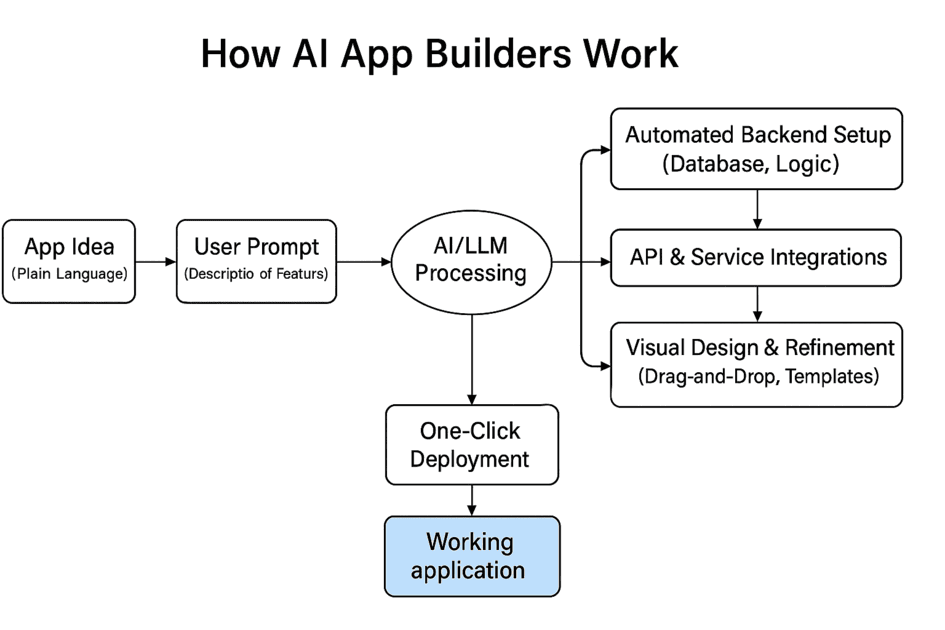
Core components of an AI app builder
Several key elements make these platforms effective:
Language Models (LLMs): The central engine that interprets natural language prompts and translates them into working code.
Visual Design Interfaces: Drag-and-drop tools and customizable templates that simplify user experience and layout design.
Automated Data & Backend Setup: Built-in tools that generate database schemas and manage backend logic without manual configuration.
Integration Frameworks: Pre-configured connectors for APIs and third-party services, enabling features like payments, authentication, or analytics.
Hosting & Deployment: Many platforms provide integrated environments for testing and publishing apps with just a few clicks.
Together, these components make AI app builders powerful for rapid prototyping, experimentation, and even production-ready apps — reducing technical overhead while still leaving room for customization and scalability.
How much does it cost to build an AI app?
The cost of building an AI app varies greatly depending on the approach.
No-code AI app builders typically operate on a subscription model, with monthly fees ranging from $30 to $300+ depending on the platform and included features. These are attractive for startups or individuals who want to experiment quickly without heavy upfront investment. They’re best suited for prototyping or lightweight apps that don’t need advanced integrations.
Custom AI app development is more resource-intensive but provides far greater flexibility. Depending on the complexity, development costs can range from $20,000 for simple projects to $200,000+ for advanced, enterprise-grade applications. Costs rise when projects involve large-scale data pipelines, real-time analytics, or specialized integrations.
When thinking about budget, businesses should focus on ROI, not just the upfront cost. A low-cost app may save money initially but might not scale or deliver measurable returns. Conversely, a well-built custom AI app can streamline operations, enhance customer engagement, and drive significant revenue, offsetting its higher development costs.
Why custom AI app development Is different
While no-code and low-code AI app builders are valuable for experimentation, they come with limitations:
Scalability issues: Many builders struggle to handle complex workflows or large datasets as usage grows.
Security gaps: Sensitive industries like finance, healthcare, and agriculture require compliance-grade security that off-the-shelf builders rarely offer.
Integration challenges: Generic builders may not integrate smoothly with legacy systems, proprietary APIs, or advanced IoT devices.
Companies should consider custom AI app development when:
1. They need to handle sensitive data with strict privacy requirements.
2. Their app must integrate deeply with existing enterprise systems.
3. Long-term scalability and performance are priorities.
4. They aim to differentiate with unique features that go beyond standard templates.
Next step: If you’re evaluating whether to use a no-code builder or invest in a custom solution, partnering with an experienced software development company can help you weigh costs, ROI, and long-term sustainability.
Best AI App Builders for 2026 (No-Code & Low-Code Options)
Appy Pie
Appy Pie: User-friendly, drag-and-drop AI app builder.
Pros: Affordable, quick to launch.
Cons: Limited scalability and customization.
Builder.ai
AI-powered platform for building mobile and web apps.
Pros: Strong automation features, decent flexibility.
Cons: Costs can add up with advanced options.
Akkio
Focused on AI and machine learning without coding.
Pros: Great for analytics and prediction apps.
Cons: Narrower scope — less suitable for full-scale mobile apps.
Lobe (by Microsoft)
Free, simple platform for training machine learning models.
Pros: Easy entry point for beginners.
Cons: Best for prototypes; limited enterprise features.
Glide
Turns spreadsheets into apps with AI enhancements.
Pros: Fast prototyping for business workflows.
Cons: Limited complexity; not ideal for consumer-facing apps.
How to build apps in 2026?
Looking ahead, building apps in 2026 will be more accessible than ever — but the right approach depends on who you are and what resources you have.
For beginner developers or individuals with limited budgets, experimenting with AI-powered app builders is a great way to start. With a few paid subscriptions and consistent effort, it’s possible to create functional apps, learn the basics of development, and even launch a working prototype. Success will largely depend on how much time you’re willing to invest and how effectively you use these tools.
For small and mid-sized companies, AI can be scaled up strategically. Beyond simple no-code platforms, businesses can leverage AI agents, specialized tools, and the expertise of technology partners to set up AI-powered processes that enhance productivity and open new revenue opportunities. Importantly, AI doesn’t have to consume your entire budget — when planned carefully, it can deliver strong ROI without draining resources.
If you’d like to explore how to invest in AI wisely and distribute your budget across AI capabilities, our team can help you evaluate the options and design a strategy tailored to your goals.



